What is the difference between AI in the Loop and Human in the Loop
The difference between AI-in-the-loop and Human-in-the-loop
Welcome to AI In The Loop! In this article, we'll explore the difference between having a human-in-the-loop when working with AI and having AI-in-the-loop.
What is AI-in-the-loop?
We are all familiar with the human-in-the-loop paradigm: we have an automated process, performed by AI agents, and, at critical points, human governance is required to validate that the AI did what it is supposed to. It works very well for agentic processes, but what about human-driven processes?
When we have human-driven processes, we need to flip the model around and, instead of having a human in the loop, we can add AI to the loop to assist us. So both paradigms have AI and humans working together, but the big question is, who owns the process, a human or AI? My assertion is that any process that requires human creativity is inherently a human-driven process, whether that is writing fiction or poetry, creating music, creating art, or in the case of building production-grade software applications and services, software engineering. In the future, maybe software engineering will be a fully AI-driven process, but we have captured decades of experience and lessons learned so we are uniquely positioned to design software that will work, that will scale, that will perform well, that is maintainable, that is observable, and so forth.
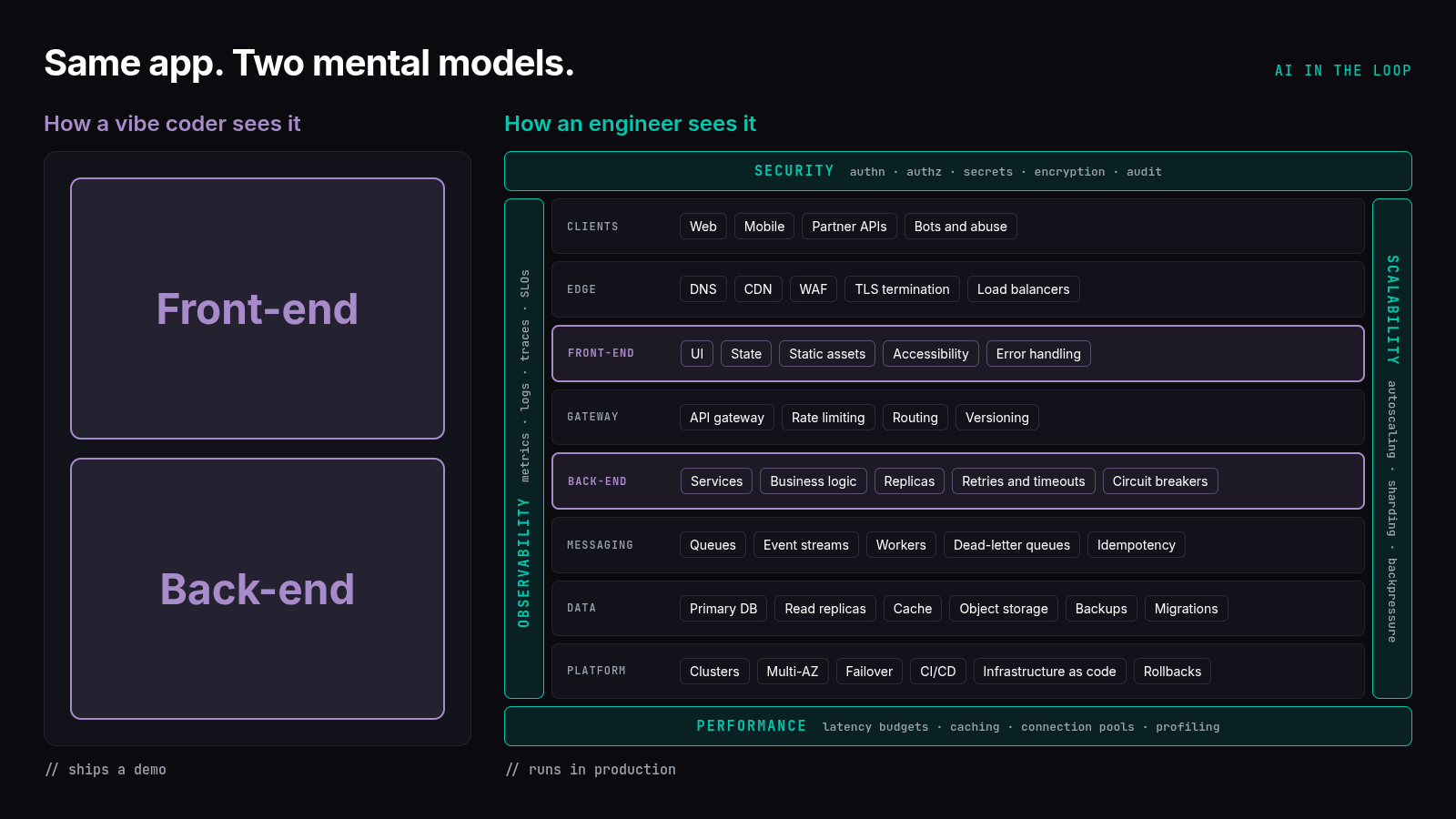
This is why you see non-technical people vibe coding applications that are far from enterprise ready. Given, some platforms allow you to vibe code something that, probably unknown to the vibe coder, runs on top of a framework that an experienced development team has built, and it will perform well enough. But we are not seeing many enterprise-scale applications coming from vibe coders, they are coming from experienced engineers and architects like us. To illustrate this visually, consider how a vibe coder understands the layers of an application compared to how an engineer understands the layers of an application:
Does that mean we should abandon AI and write our applications all by hand? Of course not! As software developers we have seen tools evolve. A long time ago we wrote machine code, then assembly code, then C that was compiled to machine binaries, then Java that was compiled to bytecode that ran in a Java Virtual Machine, Python and JavaScript that run in interpreters, and so forth. The purpose of these tools was to make it easier to build and organize software so that any developer can look at, understand how it works, and make changes to it. Do you ever want to go back to writing machine code? These abstractions have allowed us to solve more complicated problems.
AI, from this perspective, is the next tool we're adding to our toolbox. Ultimately, the code we write or even the code generated by prompts, will eventually become machine code that runs on a server, a desktop or laptop, or even a phone.
How Do We Implement AI-in-the-loop?
The strategy that you use to incorporate AI into your workflow is yours, but I wanted to share the strategy I have developed over the past year. You can watch the video on YouTube here:
My approach has two main steps:
- Spend the time upfront to fully flesh out your requirements. I have a Claude Skill in the Resources Section that interviews you to gather enough information to help you generate a requirements markdown file
- I implemented an agentic framework that models the software development lifecycle
The agentic framework defines the following agents:
- Product Manager Agent — interactively asks you questions to translate your requirements markdown file into a formal Product Requirements Document (PRO)
- Technical Architect Agent — interactively asks you questions to translate the PRD into a technical architecture, breaking the implementation steps down into multiple phases if necessary
- Software Engineer Agent — implements the current phase of the technical architecture
- Software Engineer Test Agent — writes unit tests for the code that the Software Engineer Agent wrote
- Build Agent — runs the build and tests to ensure that the code compiles and the tests pass
- AI Review Agent — performs a code review. If it finds issues, it works with the Software Engineer agent to make changes
- Your Review — a GitHub Merge Request style interface where you can review the code and raise issues. If you find an issue, the Software Engineer Agent will review your feedback, make the changes, or even explain why it doesn't want to make the change. In the end, you own the code so you can override the Software Engineer Agent and it will do whatever you want it to
- QA Architect Agent — interactively asks you questions to build a formal QA test plan
- QA Engineer Agent — implements and runs the test plan
- UAT — pauses the workflow to allow you to test the application. It keeps an open conversation with the Software Engineer Agent that will fix any issues you find
- Deploy Agent — deploys the application to a test environment, which may be a local Docker Compose, an on-prem environment, or even a development environment running in the cloud
The purpose of doing this is to keep you in control: you define the requirements, give the Product Manager enough information to build the PRD, give the Technical Architect enough information to build a technical design, review the code after it has been proven to build and run and has already passed through an AI code review, meaning that it should be good code by then, guide the QA Architect with the requirements and constraints it needs to build a test plan, and ultimately test the final application and request changes. Again, I assert that software development is a human process and we're delegating the work of building the requirement and design artifacts and implementing and testing the code to AI. This is how we control the process and add AI to our loop.
Conclusion
My early experience building applications with AI was not optimal. I got code that didn't compile, tests that didn't pass, and missing features in the applications and services I was building. It was only after I changed my perspective that I realized that my years of experience building, deploying, maintaining, and observing software, meant that building software is not an AI process, but rather is a human process. Instead of abandoning AI, I decided to leverage it where it adds the most value and makes me the most productive, while staying in control of the process.
I encourage you to watch the YouTube Video for a lot more detail, including the lessons I learned while building this framework, both to improve the results I was getting and to manage my AI costs.